
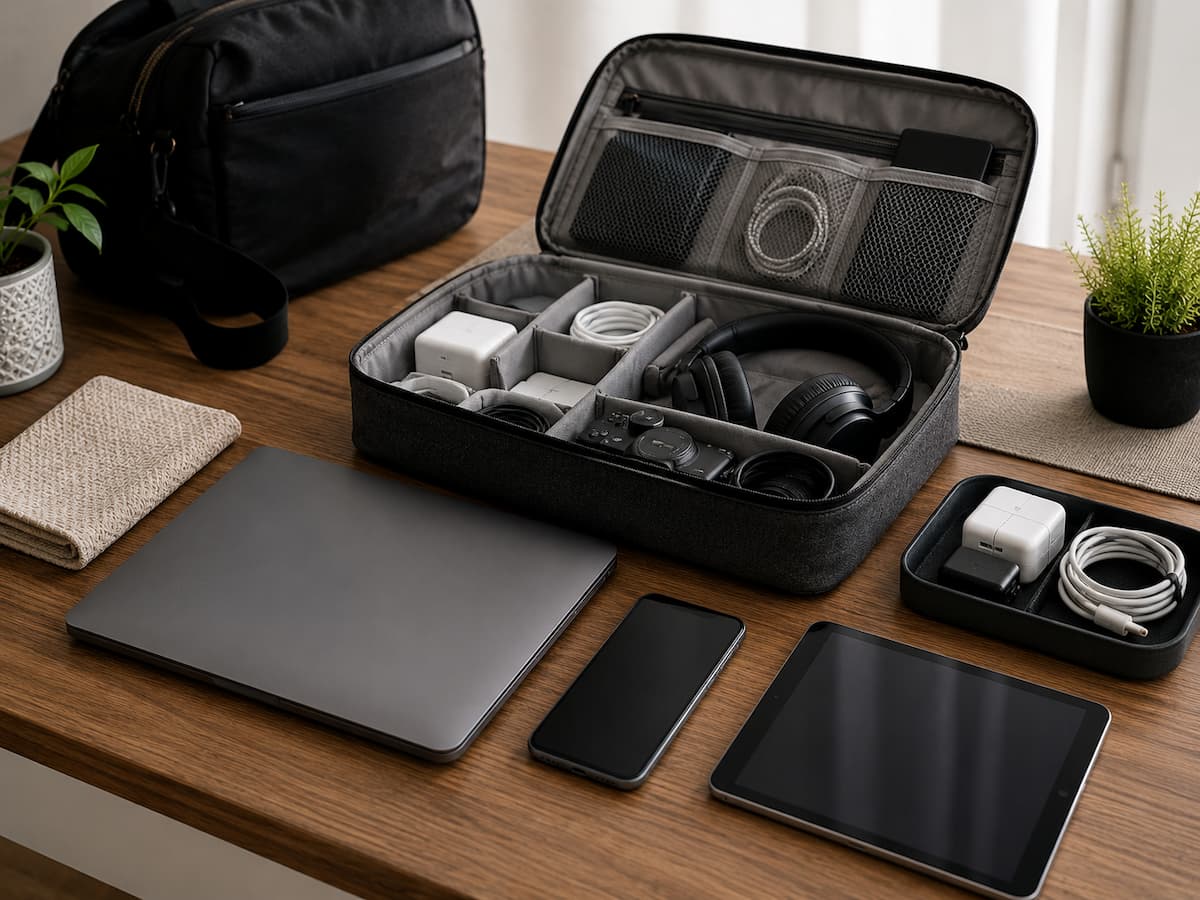
Choose a Dry, Stable Place
The storage location usually matters more than the container. A dry interior cabinet, drawer, shelf, or storage box is better than an attic, cellar, garage, shed, or other place with fluctuating temperature and humidity. Because condensation and continuous dampness can damage electrical components, moisture demands special attention. A device can be stored improperly even if it’s not wet. When devices are repeatedly transported between cold and warm settings, condensation can occur.
Avoid placing devices on floors where they may spill, become dusty, or be hit. Keep children away from radiators and other heat sources. Window sunshine can significantly raise room temperatures, especially in closed containers. A damp, musty, or temperature-changing storage space is not ideal for precious equipment.
Clean the Device Before Storing
Cleaning equipment before storage is easier than cleaning away grime months later. In normal use, dust, skin oils, food particles, and other dirt can collect around ports, vents, buttons, keyboards, and seams. Power off and unplug the gadget. Clean screens and surfaces with special coatings according to the manufacturer’s instructions. A soft, lint-free cloth works for many exterior surfaces, although apertures and vents should be handled gently rather than filled with cleaning solvent.
Without manufacturer permission, do not spray liquid directly on an electrical gadget. Moisture entering through a port or opening might cause hidden issues. Removing unnecessary accessories is also beneficial. Disconnect chargers, headphones, memory cards, adapters, and any removable things. The device is easier to store, and ports are less stressed.
Focus on Rechargeable Batteries
Battery care is crucial for long-term electronics storage. Rechargeable batteries drain even while off. If the battery is entirely drained, a device may fail to start or charge easily. The device’s official instructions should be followed because battery chemistry and manufacturer affect stored charge. Apple recommends storing lithium-ion batteries at 50% charge for long periods. Apple advises turning off a device and putting it in a cool, dry place.
Don’t assume that storing a device with its charger connected is optimal. Device charging system and manufacturer recommendations determine long-term charging behavior. Before storing an older device for months, check its battery instructions. Note the storage date for expensive or crucial devices. That helps you recall battery checks.
Check Stored Batteries Occasionally
Long-term storage shouldn’t mean ignoring the device until needed. Check a rechargeable device periodically if it will be unused for months, per the manufacturer. No need to constantly charge it. Avoid letting the battery sit in an improper state for long. Look for swelling, leakage, corrosion, unusual heat, or physical damage when inspecting the device.
No one should squeeze, puncture, or force a bloated battery back into the device. Stop using the gadget and follow the manufacturer’s battery care instructions. Do not store an obviously damaged battery in domestic storage just because the device is off. Instead of experimenting with a broken battery, consult the manufacturer’s support information or an electronics recycling or repair service.
Store Fragile Screens and Parts Without Pressure
Heavy things can damage tablets, computers, displays, e-readers, cameras, and other electronics. A screen may appear solid but be subject to pressure, scratches, and collisions at the edges. Protect smartphone displays from sharp objects when storing. Instead of rubbing screens and housings, separate gadgets in a container with protective material.
Store a laptop with things between the keyboard and display only if the manufacturer built the attachment for that purpose. With the lid closed, pressure can impact the screen. When using cameras and other equipment with exposed lenses or delicate components, use the manufacturer’s protective coverings. The goal is to avoid scratches and physical contact without retaining moisture in storage.
Cable Handling Without Sharp Bends
Cables, which can be the first accessories to fail, are often overlooked. Wrapping a cable tightly around a charger, bending it forcefully near a connector, or loading heavy things on it can repeatedly stress the internal conductors and insulation. Store cables in loose loops, not coils. Avoid crushing connectors and squeezing cables into small storage compartments. Labeling identical cords can save time when you return to the equipment.
Pulling a cable out by the cord is wrong. Hold the connector to detach. A little habit minimizes tension at the cable-plug junction. Examine the charger and cord for cuts, exposed wires, damaged insulation, bent connections, and unusual heat before storing an electronic item. The gadget may be fine, but a damaged charging accessory should not be used.
Stay Dust-Free Without Sealing Moisture
Closed drawers, cabinets, or protective containers help reduce dust. If moisture is present, totally enclosing a device in an improper container can cause another issue. Ensure the equipment is dry before covering it. Follow the instructions on a device-specific protective case. For long-term preservation, avoid placing a damp device directly in an airtight container and expecting protection.
Sometimes desiccant items can be utilized in proper storage situations, but they cannot replace a dry location. A packet of moisture absorbers won’t fix gadgets stored in damp conditions. Choose a storage box that protects the gadget from dust and physical harm without overcrowding it.
Store Different Devices According to Their Needs
Not every electronic device should be treated exactly the same way. A television, laptop, wireless speaker, digital camera, game controller, and small battery-powered accessory may have different storage requirements.
| Device type | Useful storage consideration |
|---|---|
| Laptop | Store in a dry location without pressure on the screen or keyboard and follow the manufacturer’s battery guidance. |
| Smartphone | Power it down when appropriate, remove unnecessary accessories, and store it away from heat and moisture. |
| Tablet | Protect the display from scratches and pressure, particularly when stacking devices. |
| Camera | Protect the lens and delicate components and follow the manufacturer’s storage guidance for batteries. |
| Wireless accessories | Keep charging contacts and ports clean, and do not store loose batteries where they can be damaged. |
| Game controllers | Remove or manage batteries according to the manufacturer’s instructions and avoid placing heavy objects on controls. |
| Chargers and cables | Use loose loops and protect connectors from bending, crushing, and unnecessary strain. |
These are general storage principles, not replacements for the manufacturer’s instructions. If a device has unusual battery technology, specialized components, or specific environmental requirements, use its official documentation.
Do Not Store Electronics Where They Can Overheat
Heat can be especially problematic for batteries and other electronic components. A storage location that seems comfortable during a cool morning can become much hotter when exposed to direct sunlight or summer temperatures. Cars are a good example of an unsuitable long-term storage environment. Temperatures inside parked vehicles can rise significantly, and the repeated heating and cooling cycle is difficult on many electronic devices.
Attics and garages can present similar problems depending on the climate and construction of the building. If you need to store a device for an extended period, an indoor location with relatively stable conditions is generally easier to control. Keep devices away from radiators, heaters, fireplaces, and other concentrated heat sources. Do not cover a device that is operating or charging in a way that blocks its intended ventilation.
Keep Important Devices With Their Accessories
It is frustrating to find an old device after six months only to discover that its charger, adapter, remote control, or special cable has disappeared. Storing related accessories together can make future use much easier. Use a clearly labeled container or compartment for accessories that belong to a particular device. Avoid throwing every cable into one large box if you have several similar connectors. A small amount of organization can save considerable time later.
For devices that use removable batteries, memory cards, proprietary adapters, or special mounting hardware, keep track of those items separately if they do not remain installed. This is particularly useful for cameras and older electronics that may use accessories that are no longer easy to find. Do not, however, force accessories into the same case if doing so puts pressure on the device or screen. Keeping everything together is helpful only when it does not compromise safe storage.
Prepare Devices Before Long-Term Storage
If you know you will not use a device for several months, take a few extra minutes before putting it away. Back up important information first. Then sign out of accounts if appropriate, remove unnecessary accessories, clean the exterior, and follow the manufacturer’s instructions for battery storage. If the device contains sensitive personal information and will be stored somewhere accessible to other people, consider whether it should remain signed in. A device sitting unused can still contain emails, photographs, documents, saved passwords, or other private information.
For a device that you expect to sell or give away later, do not simply put it into storage while leaving personal information on it. When the time comes to transfer ownership, follow the manufacturer’s recommended process for backing up and resetting it. Finally, record where you stored it. This sounds obvious, but a labeled box or simple inventory note can help you avoid forgetting devices in unsuitable places.
What to Check Before Using a Stored Device Again
When you take a device out of long-term storage, do not immediately plug it in and start using it if you notice anything unusual. Inspect the casing, screen, ports, cables, and battery area first. Look for swelling, corrosion, cracks, liquid damage, damaged insulation, or signs that pests or moisture have reached the storage area. If everything appears normal, follow the manufacturer’s recommended startup or charging procedure.
For older devices, expect that software updates may be required. You may also need to reconnect the device to a network, update applications, replace an aging accessory, or recover an account before it becomes useful again. Do not ignore a battery that has changed physically while the device was stored. Unusual swelling or damage is a reason to stop and seek appropriate guidance rather than attempting to force the device back into service.
When Storage Becomes Better Than Constant Charging
People sometimes leave an unused device permanently connected to power because they want it ready whenever they need it. Whether that makes sense depends on the device and how it is designed to manage charging. The manufacturer’s instructions should determine the appropriate approach for equipment that is genuinely used as a permanently powered device, such as some home electronics. For a portable device that will sit unused for months, long-term storage guidance is more relevant than keeping it continuously connected simply for convenience.
Modern charging systems can manage power more intelligently than older devices, but that does not eliminate the need to follow manufacturer guidance. Battery chemistry, thermal conditions, charging design, and device software all affect how a product handles being connected to power for extended periods.
A Little Preparation Prevents Many Storage Problems
Electronic devices generally do not need complicated storage systems. The biggest improvements usually come from a few sensible habits: choose a dry and stable location, protect screens and fragile parts from pressure, keep cables loosely coiled, clean devices before storage, and pay attention to rechargeable batteries. For short periods, the process may take only a few minutes. For longer storage, take the extra step of checking the manufacturer’s battery recommendations, backing up important information, and periodically inspecting the equipment.
Storage is also a valuable opportunity to remove devices you no longer need. If something has not been used for years and has little practical or sentimental value, keeping it indefinitely may create clutter without providing a useful backup. The goal is simple: when you need the device again, it should be clean, intact, safe to power on, and ready to do the job it was stored for.
FAQs
1. Can I store electronics in a plastic container?
A proper container can prevent electronics from dust and physical harm, but the gadget must be clean and dry before storage. The container also needs to be suitable for the storage environment and should not trap moisture around the device already present.
2. Should I remove batteries from a device before storage?
It depends on the device and battery type. Follow the manufacturer’s directions. Separate storage guidelines may be available for removable batteries, but built-in rechargeable batteries will likely require the device-specific guidance offered by the manufacturer.
3. Is it safe to keep devices in a garage?
Depends on the circumstances. Garages can have wide temperature and humidity swings and may expose gadgets to dust or moisture. In general, it is easier to control a stable indoor environment for valuable electronics and long-term storage.
4. Should I charge a device to 100% before I store it?
Not really. Rechargeable batteries have varied storage needs. Some manufacturers advocate a partial charge for long-term storage of lithium-ion devices. Don’t assume that a full charge is always the best option; follow the guidelines for the gadget you have.
5. How often should I check in a long-term storage unit?
There is no standard interval because gadgets and batteries are different. Periodic inspection of equipment stored for several months or longer is recommended, especially if it contains a rechargeable battery. Follow the manufacturer’s recommendations if possible.

Daniel Mercer writes about everyday technology problems, including computer and network troubleshooting, device care, software and apps, digital organization, and online privacy. He focuses on practical explanations that help readers understand what may be causing a problem before changing settings or replacing equipment. Daniel prefers clear, straightforward guidance over unnecessary technical jargon and aims to make technology easier to understand for everyday users. His work appears across FinStructura’s five main content areas.